

Tech ideas that made the web move quicker
The internet became faster because of several innovative ideas working together. The first idea was to replace dial-up connections with much faster broadband connections. Then, content delivery networks were developed so users would acquire their website files from a server location closest to them. Next, two new versions of HTTP were released (HTTP/2 & HTTP/3), which allowed browsers to communicate better with servers. Caching, compression, edge computing, and mobile networks such as 5G were also implemented. The technologies listed above were not all developed simultaneously. Each technology was built on top of one another over time. Before all of these technologies, the internet was slow, inefficient and very frustrating.
Today we use fast, reliable access to the internet.
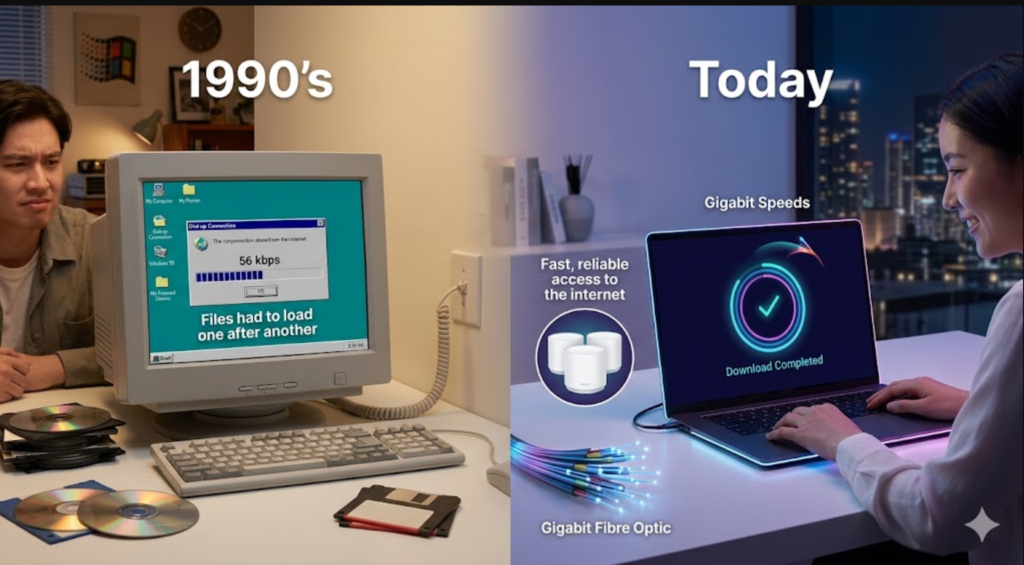
In the ’90s, a dial-up connection took between 30 and 60 seconds to load a single page. The speed of the dial-up connection was only 56 kbps. Gigabit speeds, which are currently available via fibre optic cables, are approximately 18,000 times faster than dial-up connections. Faster than that.
At the same time, there were many problems that worked against the early Internet. Developers, companies, and engineers had to fix most of those problems before any progress could occur. Here are some examples of those issues:
Files had to load one file after another.
1: All requests for websites came from one server.
2: Files being sent were not compressed.
3: Rendering engines used by browsers were very basic and relatively slow.
4: Internet was not yet available via wireless devices.
5: This left a web experience where users had to wait a long time just to read one paragraph of text. Fortunately, developers, companies and engineers worked hard to fix every problem on the list above. Below are how they did it.
What are the 14 tech ideas that made the web move quicker?
The innovations that improved internet speed did not originate from one place. Some focused on physical infrastructure, including cables and connections. Others changed the way browsers and servers communicated. Other solutions decreased the amount of data transferred. Finally, others brought servers closer to users. Here is an overview of each technology before discussing it individually:
Technology: What It Does and Its Key Benefits
Broadband internet provides faster physical connections and increased bandwidth. Content delivery networks (CDNs) distribute content worldwide with lower latency.
Web caching saves already loaded files, which reduces the need for repeat downloads.
Data Compression (Gzip/Brotli) reduces the file size and data transfer speed.
HTTP/2 & HTTP/3 server-browser communication Better Faster load Multiple files at once
AJAX page elements loaded without a full reload for a smooth user experience.
The cloud computing distributed server environment improves uptime and scalability.
Edge computing data processes near the user decrease real-time latency.
JavaScript Engines (V8) Faster script execution makes web apps snappier.
5g/Mobile Networks fast wireless connections Better web performance via mobile
Core Web Vitals Performance benchmarking improves SEO and ux
WebAssembly (wasm) native browser performance Complex applications in the browser
1. Broadband internet: starting point of speed revolutions
Glass fibres transmitting Broadband internet connection to computer
Broadband internet replaces slow dial-up connections that maxed out at 56 kbps.
Broadband was the first large advancement. It replaced dial-up connections that required using a phone line to call the ISP for internet access. Broadband through DSL and cable provided speeds in excess of 256 Kbps and 1 Mbps. Although this technology represented a significant advancement at the time,
Then came fibre-optic broadband, which provides speeds greater than 1 gbps. Fibre sends data as pulses of light along glass cables. Pulses of light transmitted through glass cables are much Faster than electrical signals through copper wires.
Broadband introduced always-on connectivity. Users no longer had to dial in or wait for their connection to complete. This alone enabled all subsequent advancements listed above. Consistent high-speed connections are essential for expanding CDNs, cloud computing, and streaming services.
today, Broadband internet is the minimum standard upon which all other technologies rely.
2. Content Delivery Networks (CDNs) deliver web content globally from various locations.
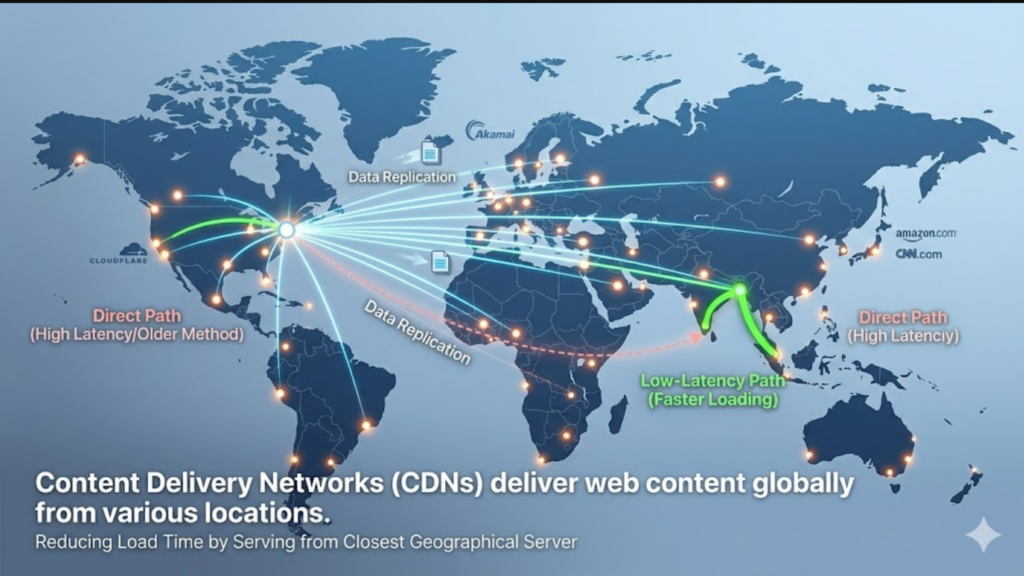
Map of the globe displaying global cdn server node distribution providing low-latency access to websites A cdn duplicates content across server locations throughout the world, enabling users to retrieve website files from the closest geographical server, thus reducing load time.
Let us consider an analogy. Imagine ordering food from a restaurant located on the opposite side of the world. Now imagine that same restaurant had a satellite office located directly outside of your home. That is essentially what a content delivery network does for websites. A CDN replicates copies of a website’s content across multiple servers located in various geographic locations around the world. Upon visiting a website, users will receive content from the server located in the greatest proximity to their location based on geography. This decreases the amount of distance that data must travel, thus decreasing latency and increasing the loading speed of pages.
Both Cloudflare and Akamai are examples of major organisations using CDNs to provide their customers with rapid loading speeds. Additionally, many popular online businesses, such as Netflix, Amazon.com, cnn.com, and Microsoft, utilise CDNs to support the rapid growth of their customer bases. Prior to the use of CDNs, a user in Bangladesh attempting to access a website hosted in New York would experience significantly slower page load times compared to a user in New Jersey accessing the same site.
Content delivery networks (CDNs) were among the largest contributing technological concepts that allowed web applications to improve at scale.
3. Web Caching: Browsers remember what you have already loaded.
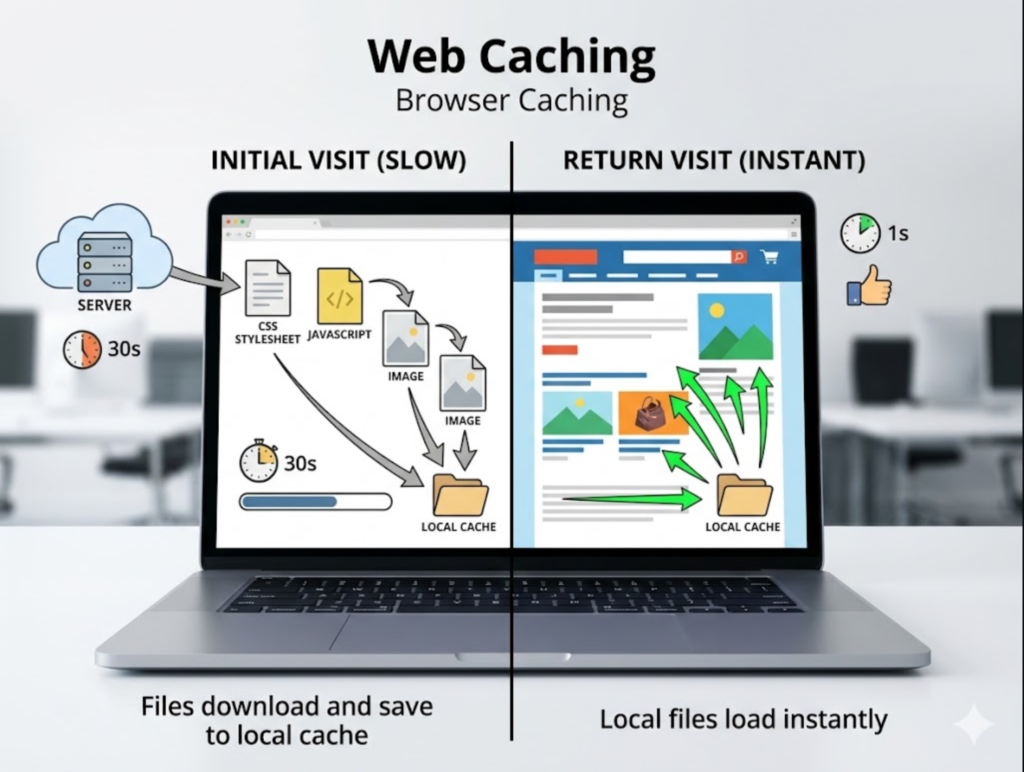
Laptops display fast page reloading due to browser caching, which stores previously downloaded files locally.
Browser Caching allows web Browsers to store CSS, javascript and image files locally, so when returning users visit a website, they will have almost instant access to page content.
When you initially visit a website for the first time, your web browser downloads all files associated with that website, such as CSS stylesheets, javascript files, Images and fonts. Web Caching informs your web browser to cache those files locally so they do not have to be downloaded again during your next visit.
There are three primary forms of Caching that work together:
Browser Caching: cache files locally within the browser for Faster repeated visits.
Server Caching: store pre-rendered page responses on servers so as to prevent processing each request individually.
Edge Caching: store content at cdn edge nodes so users in close proximity receive Faster responses
Web Caching is arguably one of the simplest yet most effective methods available today for improving web performance. By leveraging web caching, developers may lower bandwidth consumption, decrease server overhead, and make repeated visits feel virtually instantaneous for users. For websites receiving extremely high volumes of traffic, Caching is not optional – it is required.
4. Data compression: send less data, receive more
Example illustrating Digital file compression resulting in a reduction of file size from 100kb to 30kb with Brotli compression can shrink a file from 100 KB to just 30 KB – reducing data transferred over the network by approximately 70%.
Every file sent from a web server to a browser uses bandwidth. Larger files require more time to send. Therefore, data compression eliminates this problem by reducing the file size prior to transmission and then expanding it after receipt so users remain unaware of the difference.
Two compression formats currently power most of the modern web:
Gzip: Has been utilised since the inception of the web and continues to be highly supported today.
Brotli: Is a relatively new compression format created by Google that can compress text-based files (HTML, CSS, javascript) more effectively than gzip.
For example, If a file is originally 100 KB uncompressed, brotli compression will reduce it to approximately 30 KB – saving approximately 70% of data transmitted over the network. If millions of users visit a particular website per day, this savings results in significant improvements in overall internet speed. Data compression is another unsung hero helping transform web performance.
5. HTTP/2 & HTTP/3: New Web Protocols Improve Connection Time
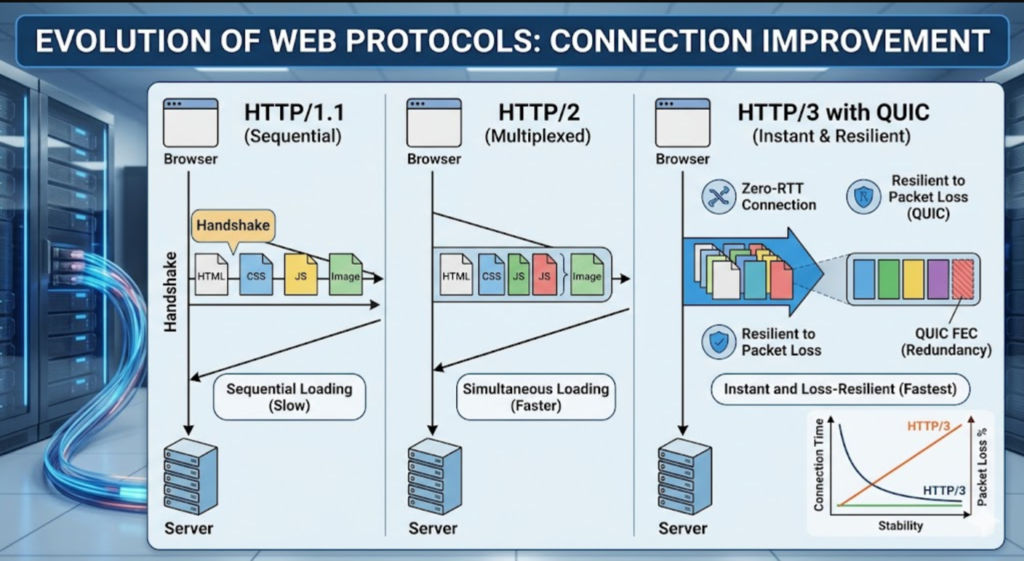
A typical server stack, displaying high-speed network cabling for
HTTP/3 communication infrastructure.
The QUIC protocol used by HTTP/3, based on UDP, eliminates the need for the handshake delay associated with slower HTTP protocols, providing a faster way to establish connections.
HTTP is the method through which a browser and a server communicate with each other. Although there have been several upgrades to the initial version of HTTP, such as HTTP/1.1, each has had limitations. HTTP/1.1 had a limitation that prevented it from handling more than one request at a time per connection. If a web page needed to download 20 different file types, then the browser would need to wait in line for each file type to be downloaded.
Here is what HTTP/2 did to address this issue.
Multiplexing enabled HTTP/2 to solve this problem. Multiplexing allowed multiple files to be sent over a single connection at the same time. Furthermore, HTTP/2 introduced header compression and server push. Header compression enables servers to compress headers before they are sent to browsers. Server push enables servers to proactively send requested resources to a client before the resource is requested. Once implemented, these two features significantly enhanced the load time for most websites.
How Much Further Did HTTP/3 And QUIC Go?
The QUIC protocol serves as the foundation for HTTP/3, improving upon its predecessor. QUIC, unlike TCP, uses UDP. This difference is critical when it comes to establishing a connection. While TCP requires a back-and-forth handshake prior to starting communications, UDP does not. Because of this, QUIC provides a faster way to connect. Specifically, it performs better under conditions where packet loss occurs. Packet loss often occurs due to issues with unstable or mobile networks. Examples of these include public Wi-Fi hotspots found in coffee shops and airports, cellular networks, and satellite networks. Therefore, QUIC provides faster connections when accessing the Internet through mobile devices or unstable networks.
All of the main browsers currently support HTTP/3. Some examples include Google Chrome, Safari, and Mozilla Firefox.
6. AJAX: The Method Through Which Web Pages Became Able To Refresh Only Portions Of Their Content
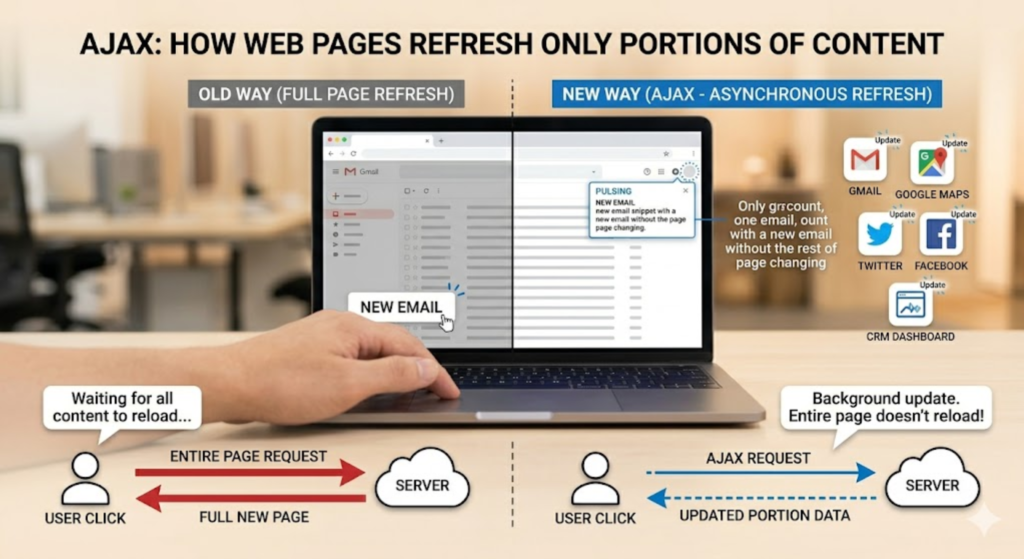
Gmail is running in a browser window, showing email messages that update dynamically without requiring a full-page refresh.
Ajax is commonly used today to provide dynamic updates to information on websites and web applications. An example of Ajax’s usage includes Gmail (email), Google Maps (directions and locations), and CRM (customer relationship management) dashboards showing real-time customer sales activity.
Prior to the creation and widespread adoption of AJAX, any time new content was added to a webpage, the entire page was required to be reloaded. When a user clicked on an element in their browser, the window would clear and the browser would fetch all the elements again to rebuild it. This process was tedious and cumbersome for users.
Ajax (Asynchronous JavaScript and Xml) is a collection of methods that enable web pages to fetch data from a remote source in the background and update portions of their content dynamically without requiring a full page reload. Users typically do not realise they are interacting with AJAX’s functionality every day, but it is used in nearly all modern web applications.
Examples of how AJAX functions:
‘Gmail retrieves new emails without reloading the email list.
‘Google Maps redraws routes in real time as you continue driving.
‘CRM dashboards in sales organizations show current sales activity instantly without having to reload the dashboard.
Twitter shows new tweets in your timeline without requiring you to click on “refresh” to see them.
Facebook displays new social media status updates instantly without requiring you to click refresh.
AJAX’s introduction marked a significant milestone in the evolution of web development. Prior to their existence, websites were static documents that did not offer the ability to interact with visitors in real time. Since the implementation of AJAX, websites have evolved into real-time applications that react immediately to events triggered by visitors.
7. Cloud Computing: Distributed Websites Across Multiple Servers Globally
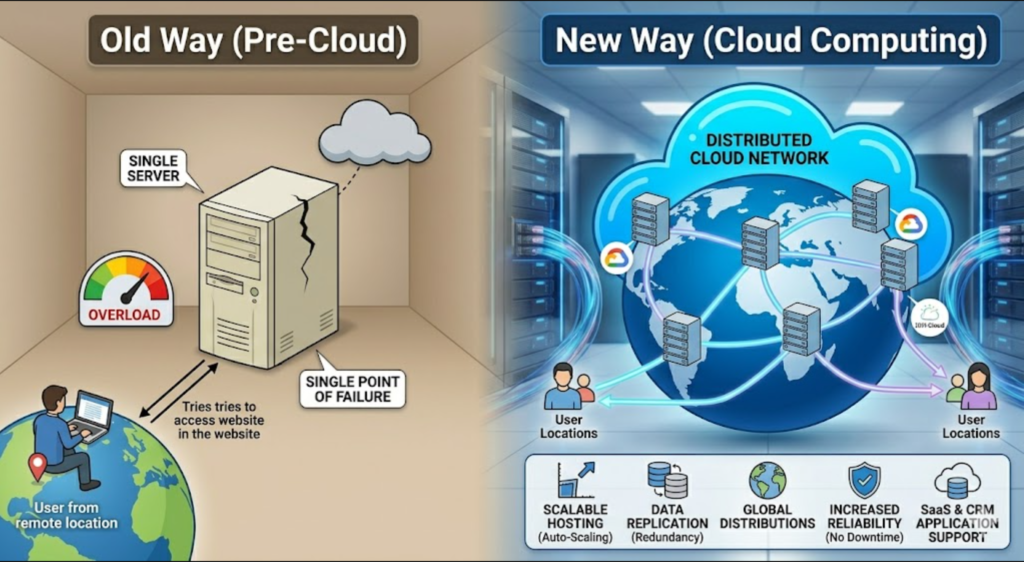
Large data centers house rows of computer racks that contain distributed cloud computing architectures.
Amazon Web Services and Google Cloud, as cloud providers, offer scalable hosting for websites distributed globally across numerous servers. This means that regardless of where a visitor is in the world, their requests will always go to servers that are close by. This reduces the likelihood of website traffic congestion.
In the beginning of the Internet era, every website existed as a single piece of hardware (server). If either the server crashed or received too much traffic (overload), then the website itself crashed as well. This architecture presented both performance challenges and reliability risks.
With the advent of cloud computing, companies now host their websites across various servers throughout multiple geographic locations. Major cloud service providers, like Amazon Web Services (AWS), Microsoft Azure, IBM Cloud, and Google Cloud, have developed extensive infrastructures composed of large numbers of servers located in multiple cities and countries around the globe. With cloud computing, businesses don’t need to develop or maintain these infrastructures themselves.
The advantages for web speed provided by cloud computing include:
1: When a website experiences a surge in traffic, it can automatically deploy additional servers to meet that demand.
2: Data is duplicated across multiple regions so that users can access it quickly regardless of their geographical location.
3: Hosting data across multiple servers reduces the downtime caused by hardware failures.
4: Software updates and patches occur without impacting site availability since they can be applied individually to separate servers.
5: Cloud computing serves as the underlying structure for both SaaS (software-as-a-service) applications and CRM (customer-relationship-management) applications. Thousands of users are able to use SaaS and CRM products simultaneously without experiencing performance degradation thanks to cloud computing distributing load across its network versus having a single server become overwhelmed.
8. Edge Computing: Performing Tasks Near Users
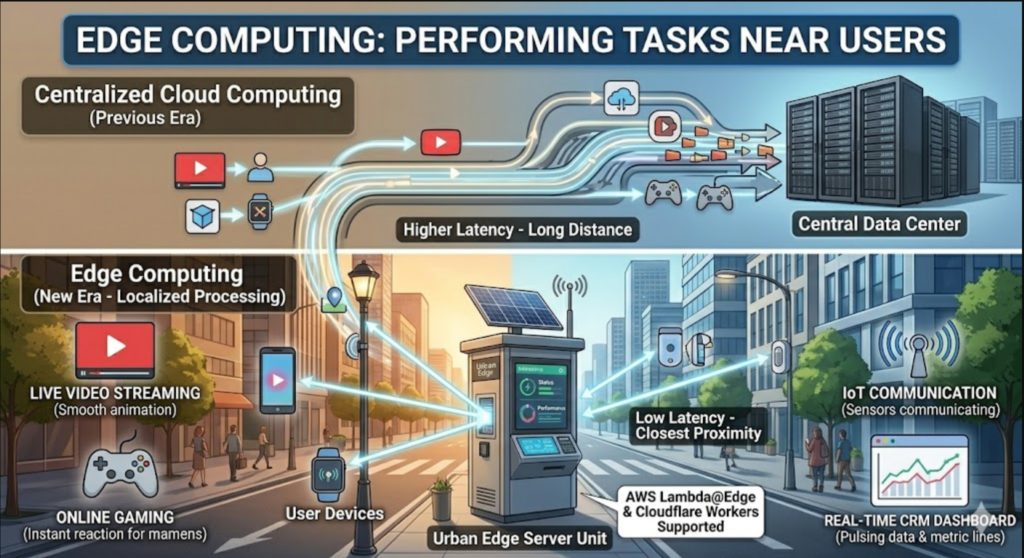
An example of an edge server unit installed outdoors in an urban environment demonstrates localised computing that is closer to users.
Edge computing brings processing power as close as possible to users—similarly, cloud computing brings infrastructure off individual servers and onto distributed networks—reducing latency when communicating with remote systems.
While cloud computing distributed the infrastructure off of single machines onto a networked system, edge computing pushed processing power as far as possible toward the user side. Rather than transmitting every request remotely to a centralised data centre located hundreds or thousands of miles away, edge computing accomplishes data processing locally on edge servers near the user.
Since edge computing significantly lowers latency for real-time applications, it has many practical implications:
1: Streaming video live
2: Online gaming
3: Communication between IoT devices
4: Real-time analytics dashboards in enterprise software
5 :Using technologies such as AWS Lambda@Edge and Cloudflare Workers allows developers to run code directly at the network edge — i.e., right next to users — enabling modern CRM platforms that display live customer data and real-time sales metrics to produce those instantaneous updates.
9. Browsers’ Rendering Engines: The Hidden Speed Machines
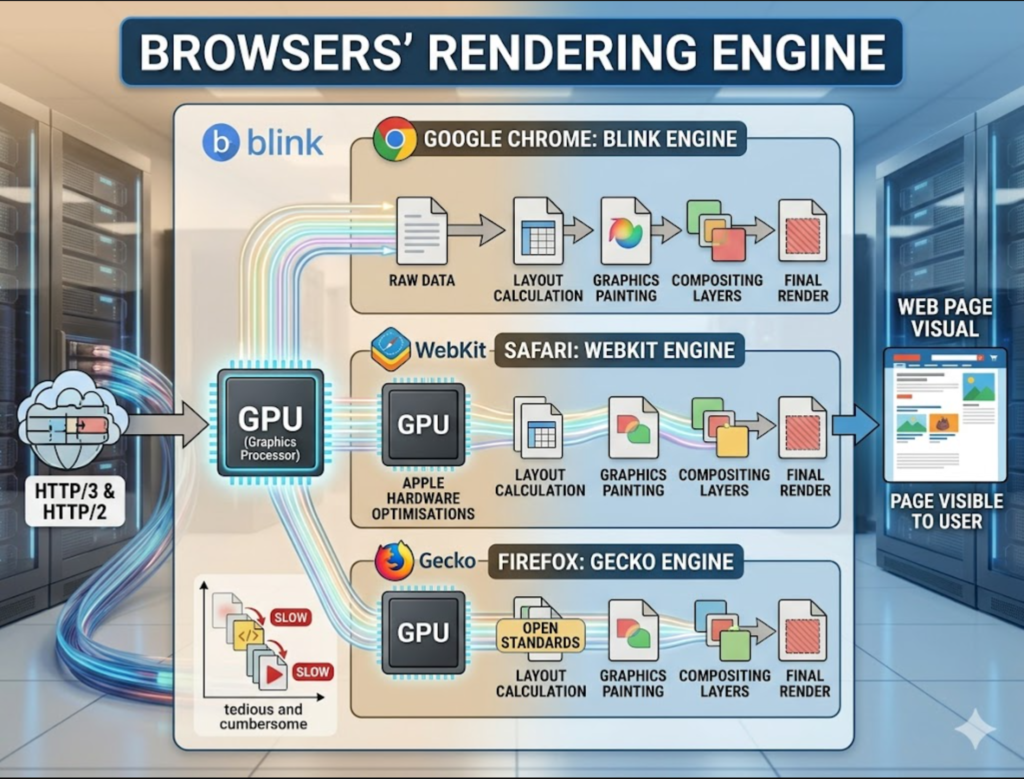
A desktop monitor displays three open browser windows, rapidly loading pages in Chrome, Safari, and Firefox.
Modern rendering engines such as Blink (in Chrome) take advantage of graphics processors to render web pages visually faster than previously.
Although it doesn’t matter how quickly data arrives from servers if nothing is translating that raw data into visible content for users, some form of rendering engine exists on the browser side. Each major browser has its own rendering engine:
Blink is responsible for roughly 80% of all web traffic in the world and supports Google Chrome.
WebKit supports Safari and leverages Apple’s hardware optimisations.
Firefox uses Gecko, which prioritises supporting open standards.
Rendering engines today use GPUs (Graphics Processors) to accelerate visual tasks such as calculating layouts, painting graphics and compositing layers in parallel vs. sequentially. This results in smoother-feeling interfaces with quicker responses.
Rendering engine improvements have been equally significant over recent years, similar to the impact of network improvements in delivering data to clients. Even with higher-bandwidth pipes that can deliver data faster than previous generations, poor-performing rendering engines can make users feel like they’re waiting longer than necessary for web pages to appear in their browser.
10. JavaScript Engines and JIT Compilation: What Makes Web Applications Feel Like Desktop Apps

A developer is coding JavaScript on a laptop screen, demonstrating the performance optimisation capabilities available in the V8 Engine.
The V8 Engine utilized in Google Chrome utilises Just-In-Time compilation to convert JavaScript into machine code while executing, greatly improving performance for web apps compared to traditional interpretation techniques.
Modern websites primarily rely on JavaScript running inside browsers to provide interactive functionality. When JavaScript first emerged, developers executed it line by line as an interpreted code, which led to performance problems with more complex operation sequences.
The majority of modern JavaScript engines, including the V8 Engine (the engine behind Google Chrome) and SpiderMonkey (the engine behind Mozilla Firefox), utilise a feature known as Just-In-Time (JIT) compilation. Unlike traditional JavaScript interpreters, which execute lines of code one at a time and interpret them into native machine code, JIT compilers translate JavaScript directly into native machine code while executing programs. This greatly improves execution performance.
This improvement is clearly observable today, as complex data tools (e.g., spreadsheets), editing tools (e.g., video editors), real-time dashboard tools (e.g., CRM dashboards), along with many other types of applications that would have required installing desktop software ten years ago, are now able to function seamlessly within a browser tab.
Web browsers are built to render HTML, CSS, and JavaScript as fast as they possibly can. Could we consider adding a few more of these to our site? The answer is simple: adding more scripts doesn’t necessarily mean things will go faster. If a majority of your users view the same page, there’s likely room for optimisation. Here are some quick tips to kickstart your journey:
• Remove unnecessary scripts. Think about whether the script you’re adding is really going to provide something useful. If it’s not essential, consider removing it.
• Optimise existing scripts. Look through your existing JavaScript files and find opportunities to optimise them. Are there any unused functions or variables? Can you remove them?
• Use lazy loading. Lazy loading allows you to load certain resources (like images or videos) only when they come into view. That way, users don’t waste bandwidth downloading things they’ll never see.
• Minify scripts. Minification removes unnecessary characters from your code, reducing its overall size. • Cache frequently used scripts. Since many users access the same pages repeatedly, it makes sense to cache those frequently used scripts locally so that subsequent requests can be fulfilled immediately without having to fetch them again.
• Reduce HTTP requests. Each HTTP request takes a little bit of time. To reduce the number of requests, try bundling related resources into a single bundle and then requesting them in bulk.
You can take advantage of these strategies to improve the performance of your web applications.
Now let’s talk about the future of web development. As we’ve discussed before, the primary goal of building a website is to create something easy to maintain and modify. There are also a few other goals that may vary depending on who is creating and modifying the website, such as making money or providing value to others; however, regardless of your motivations for building a website, the end result should always be to create something useful. Although there isn’t a universal solution for building a website, we’ve discussed several topics that could potentially meet your needs, such as selecting an open-source framework for your project and writing clean and readable code. What other questions would you like answered?
Before I go, here are some additional resources you might find helpful:

• https://www.tutorialspoint.com/javascript/index.htm – Tutorial Point has created a free JavaScript tutorial that covers syntax, data types, arrays, objects, methods, loops, events, and more. It includes examples and quizzes to help reinforce learning.
• http://javascript.info—JavaScript.info is another popular resource that provides comprehensive tutorials covering both beginner and advanced JavaScript concepts. Topics include data structures, asynchronous programming, event loops, closures, functional programming, and more!
• https://developer.mozilla.org/en-US/docs/Learn/Getting_started_with_the_web—The Mozilla Developer Network is a fantastic resource for anyone looking to learn about front-end development. They offer articles on HTML/CSS/JavaScript basics, plus tutorials for more advanced topics.
• https://www.sitepoint.com/web-development-tutorials/—SitePoint offers a wide range of tutorials for beginners and experienced web developers alike. Their library features articles on everything from WordPress to React.
• https://css-tricks.com/ – CSS-Tricks is a wonderful resource for designers and developers alike who want to dive deeper into styling elements and understand various CSS properties.
If you’re interested in learning about back-end development or APIs, here are some additional resources:
• https://en.wikipedia.org/wiki/List_of_APIs#Programming_languages – Wikipedia has put together a list of API libraries available in different programming languages. Take a look to determine which language(s) you’d like to focus on.
• http://apiary.io – Apiary is a tool designed specifically for designing RESTful APIs. It allows you to define endpoints and parameters in a visual format and generate documentation automatically.
• https://restfulapi.net/ – RestfulAPI.net is a tutorial series focused on building RESTful APIs with Node.js and Express.js.
• https://expressjs.com/ – ExpressJS is one of the most popular frameworks for building Node.js-based APIs. They have extensive documentation and guides to help you get started.
• https://docs.aws.amazon.com/amplify/latest/userguide/get-started.html – AWS Amplify is a set of tools that simplifies the process of integrating AWS services into a web app. Their documentation includes tutorials on how to integrate services like authentication, analytics, and storage.
I hope this information has helped inspire you to continue learning and experimenting with web development! Don’t hesitate to reach out if you have any additional questions. Happy coding!
Please note: The views expressed by guest authors represent their opinions and not those of Codecademy. We appreciate diverse perspectives and encourage thoughtful discussion.
This article is part of the Codecademy Community Series featuring industry professionals sharing insights and experiences relevant to developers like you. Do you have feedback or suggestions on articles or guest writers? Please contact us at community@codecademy.com. Thank you for reading!
Codecademy builds products that teach people how to code and build anything they can imagine. If you liked this post, please share it with someone who’d enjoy it! Want to stay up to date on all things Codecademy? Follow us on Twitter! Or join our community forum! Thanks for reading – happy coding!
The Codecademy Community Series showcases voices from across the technological landscape, focusing on the experiences and perspectives of women in tech. Do you have feedback or suggestions on articles or guest writers? Please contact us at community@codecademy.com. Thank you for reading!
Codecademy builds products that teach people how to code and build anything they can imagine. If you liked this post, please share it with someone who’d enjoy it! Want to stay up to date on all things Codecademy? Follow us on Twitter! Or join our community forum! Thanks for reading – happy coding!
The Codecademy Community Series showcases voices from across the technological landscape, focusing on the experiences and perspectives of women in tech.
Meta Descriptions
Discover the tech ideas that made the web move quicker from broadband connections to content delivery networks. Learn how these innovations have transformed the internet and made it faster than ever before. 207 characters